Xbox Cloud Gaming Phone Controller Preview: How to Turn It On
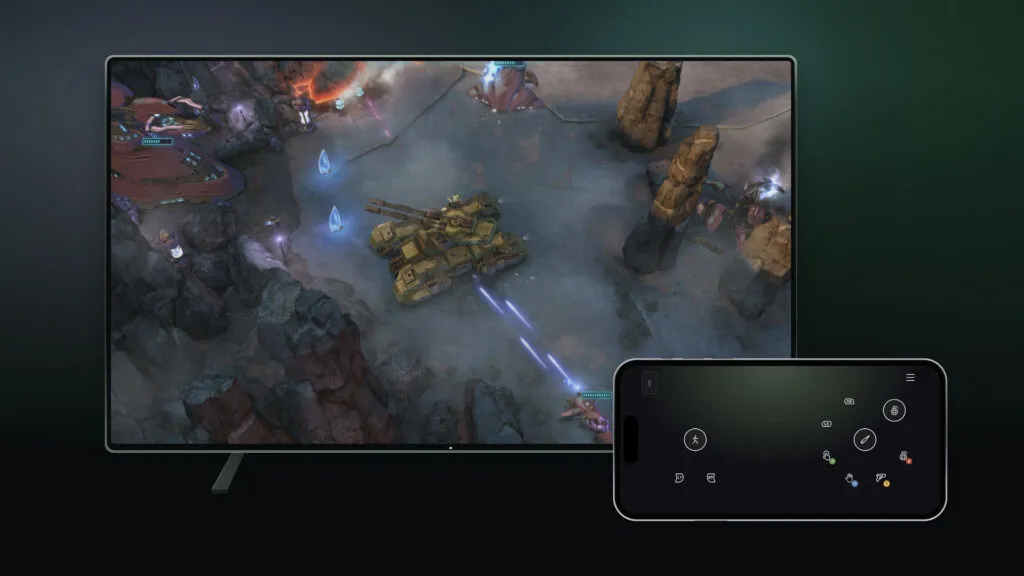
Xbox Cloud Gaming has two new previews: a phone can act as your controller on supported smart TVs, and US players can try "cloud connect" with the new Xbox Nano Controller. Xbox announced both on November 4, 2026. Here is how to switch them on and what to expect.
Quick summary
- Phone controller preview: works on supported smart TVs, with an Android or iOS phone, in countries where Xbox Cloud Gaming is available.
- Cloud connect: US-only preview that links the Xbox Nano Controller over Wi-Fi straight to the cloud session to cut input lag.
- Both are early tests; game and device support may be limited.
How do you use your phone as an Xbox Cloud Gaming controller?
Open the latest supported smart TV experience, go to Settings, then Account, and turn on Preview Features. Launch a game with no physical controller connected and the TV offers to use your phone for that session. You scan a QR code shown on the TV, and the controls open in your phone's browser, so there is nothing to install. Some games will get controls tailored to how they play.
To leave feedback, tap the Xbox icon in the top left of the phone screen and choose Give Feedback.
What is cloud connect on the Xbox Nano Controller?
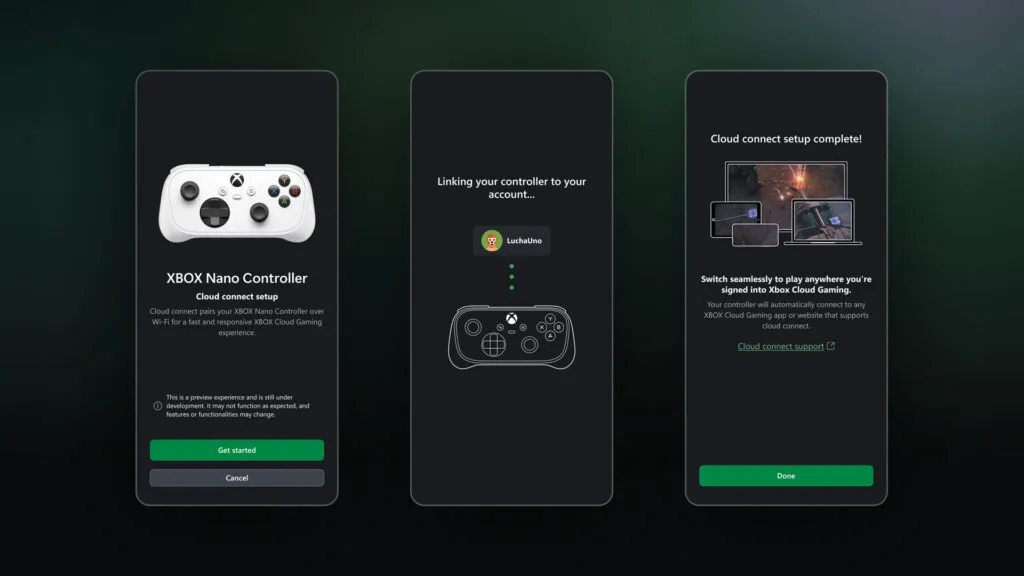
Normally a controller reaches a TV over Bluetooth, and the TV then relays your input to the cloud. Cloud connect skips that hop: the controller uses your Wi-Fi to talk directly to the server running your game. Xbox says this can reduce input latency, so play may feel more responsive. It works on supported smart TVs and the web, but not with every cloud gaming experience yet.
How do you set up cloud connect?
- Set up the Nano Controller in the Xbox beta app on Android, or the Xbox Accessories app on PC (Xbox Insider enrollment is required for the PC route).
- Follow the steps to connect the controller to your Wi-Fi network.
- Open a supported Xbox Cloud Gaming experience and sign in with the same Xbox account you used in setup.
Is it available in India?
The phone controller preview is rolling out wherever Xbox Cloud Gaming is supported, so check that your region and TV are on Microsoft's verified device list. Cloud connect with the Nano Controller is US-only for now.
Does this change the cloud gaming time limits?
No. These previews only change how you control games. For play-time rules, see our guide to Xbox Cloud Gaming monthly limits, and for the wider hardware picture read Xbox's latest earnings.
The phone option is the more useful one for most people: it removes the "no controller" barrier. Latency still depends on your connection, and a touch screen will not replace a real pad for action games. See our launch calendar for what to play next.
Frequently asked questions
How do I use my phone as an Xbox controller on a TV?
Turn on Preview Features under Settings > Account on a supported smart TV, launch a game with no controller connected, and choose the phone option. Scan the QR code; controls open in your phone's browser.
What is Xbox cloud connect?
A preview that connects the Xbox Nano Controller over Wi-Fi directly to the cloud server running your game, instead of via the TV's Bluetooth, which can cut input lag.
Is cloud connect available outside the US?
Xbox says players in the US can preview it starting today. The phone controller preview is available wherever Xbox Cloud Gaming is supported.
Do I need Xbox Insider for cloud connect?
Xbox says Insider enrollment is required if you set up the controller through the Xbox Accessories app on PC; the Xbox beta app on Android is the other setup route.
Related articles
 Xbox Cloud Gaming Hour Limits: 15 Hours on Game Pass Ultimate
 BGMI 4.7 Update Release Date in India: Sub-Zero Mode, Features
 GeForce NOW vs Gaming PC in India: Real Cost BreakdownGeForce NOW India 4-Month Plans: ₹3,499 Price and Savings
Xbox Wire
Warp Pipes digest
Images belong to their respective owners and are used for news reporting and commentary.